Audi A6 e-tron
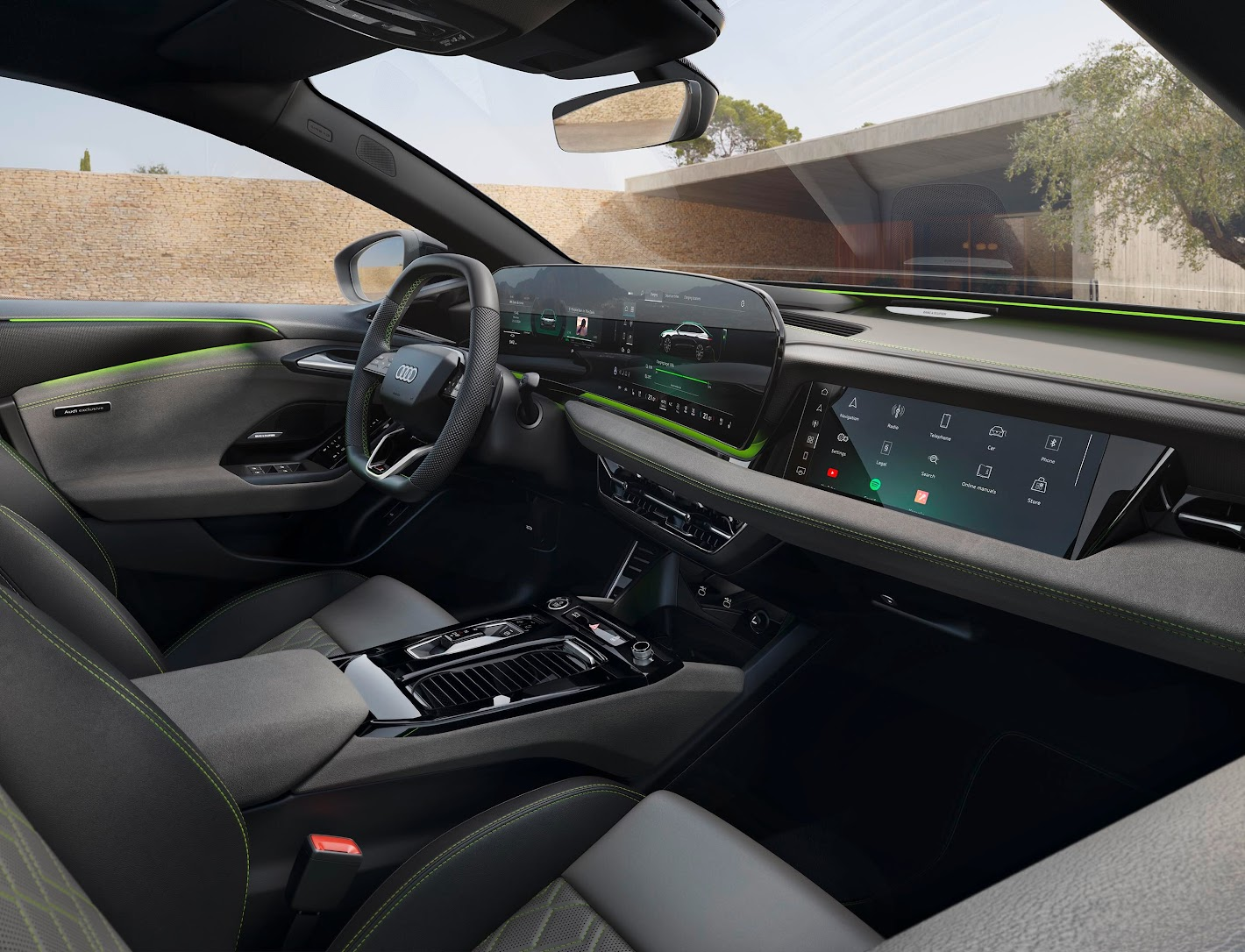
| Car finder | The vehicle's parking position is displayed on the map in the myAudi app¹, helping you find your car. |
| Vehicle status | Remote access to the vehicle status allows you to conveniently retrieve a wide range of information from your smartphone via the myAudi app1. Information can include for example the following: battery state of charge, electric range, status of charging connector, locked status of doors & windows, light status, service interval, warning lights & messages. |
| Remote lock/unlock | The vehicle can be locked and unlocked conveniently by smartphone using the myAudi app¹. Car cannot be started without the vehicle key. |
Theft alarm notification | If the anti-theft alarm is triggered, a push notification is sent to the smartphone via the myAudi app¹. Only if push messages have been enabled to receive notifications. |
Remote charging | The myAudi app can be used to check both the available range and the charge status quickly and easily. The charging process can also be started conveniently. If necessary, a charging timer can be provided. |
Comfort remote preconditioning | The auxiliary air conditioning can be controlled simply via the myAudi1 app so that the interior can be set to the desired temperature before starting your journey. |
Digital assistant | The AI powered digital assistant helps answer questions you have on your car. It will share the relevant helpful information from your manual based on the questions you ask. |
Audi Connect emergency call | If you have a serious accident, an emergency call is made automatically. Data relevant to the accident such as the location or the number of vehicle occupants is transmitted to the Audi Emergency Call Centre to enable the right assistance to be organised quickly. Trained call centre agents assist the individuals involved in the accident even while abroad in the driver’s national language² and also provide the local rescue services with all the details relevant to the rescue. The Audi connect emergency call can also be placed manually via a button. The statutory emergency call service, the Audi connect emergency call & service package and the Audi connect remote & control package are provided via a SIM card installed in the vehicle. The costs of calls and data connections from the vehicle are included in the price of the services. The services provided by Audi are available only within the range of the mobile phone network of the mobile phone provider chosen by Audi. In areas with insufficient GPS reception or outside the range of the particular mobile phone provider, some functions/services may not be able to send/receive data and may not be available or available only with limitations. The services under Audi connect emergency call & service are provided for 10 years from new vehicle delivery. The services under Audi connect remote & control can be used free of charge for 3 years from new vehicle delivery, and can then be extended at an extra charge. The statutory emergency call is available from new vehicle delivery for an indefinite period of time and meets the legal requirements of the pan-European emergency call system (eCall). |
Online roadside assistance | In the event of a breakdown, the online roadside assistance can be activated via the service call button in the roof module. The vehicle establishes a voice connection with the Audi Assistance Centre. In many cases, the issue can be identified based on the data sent by the vehicle and a fast solution suited to customer requirements can be found. |
Audi incident assistance | If the vehicle sensors detect a minor accident without the airbags being triggered and/or the seat belts tensioned, a window opens automatically in the MMI display that allows customers to select whether they require assistance with processing the incident or whether an emergency call should be placed. In both cases, specially trained service staff are available to assist. |
Automatic service reminder | With Audi Connect's Automatic Service Reminder you'll never miss a service appointment again. Your car can automatically send vehicle and service data to your preferred Audi Centre so they can conveniently organise your service for you. You can select your preferred Audi Centre in your myAudi app. |
Online Car Care | Informs you in advance of any necessary service appointments. Active warnings or messages are also displayed in your myAudi account after the journey. Depending on country-specific availability. Prior registration and verification as the key user is required first via your myAudi app. This service uses personal data. |
Audi Assistant | The Audi assistant⁷ makes interaction with the vehicle easier through voice control for numerous vehicle and infotainment functions. In conjunction with Audi connect, the assistant also provides access to a wide range of online content such as the latest weather or possible navigation destinations². By activating “proactive suggestions and routines”, the Audi assistant⁹ gets to know the logged-in person in order to make use of the vehicle even easier and more convenient. |
Online points of interest | Navigation provides direct access to POIs (e.g. petrol/charging stations and car parks) from third-party providers. You can also call up dynamic additional information such as reviews, opening times, current fuel prices and availability of parking/charging spaces. Using the MMI touchscreen, points of interest such as car parks or places of interest can be selected in the navigation map in order to display relevant additional information directly. By integrating user reviews and photos, it is even easier to decide on a destination. |
On-street parking | Indicates the likelihood of finding a parking space along certain streets. In addition, useful information, such as prices or whether they are residents-only parking spaces, is available. Available in selected cities and for selected streets. |
Online traffic information | The latest traffic flow information is called up online. This provides a more accurate estimation of arrival time and the best possible route guidance. The traffic flow information is displayed in colour on the navigation map and taken into account for dynamic route guidance. |
| Online traffic information Plus | In addition to online traffic information: traffic flow data with precise lane depiction on motorways – in the region of exits and intersections, as well as in inner-city junction areas. Lane closures shown in the MMI display. In addition, predictive traffic flow data is taken into account to calculate more precise arrival times. |
Hazard information | The swarm function “local hazard alerts” warns drivers about the following incidents on their route: breakdowns, accidents, visibility obstructions and skidding risks. There is a visual display in the MMI navigation map and a visual and acoustic display in the instrument cluster. Depending on country-specific availability. |
User profiles | By creating a user for the vehicle, a variety of settings, such as ergonomic, infotainment or light settings, can be stored in a personal user profile service. The number of saved vehicle settings depends on the selected optional equipment. When getting into the vehicle, a personal greeting appears in the MMI and the individual settings for the person identified are loaded. Provided the mobile phone has Bluetooth MAP (Message Access Profile). Please contact your Audi Centre for information on compatible mobile phones. |
Access to themes | Through Themes¹ ³ in your myAudi app¹ ⁵, access an ever growing portfolio of selected background images for the MMI display and MMI front passenger display³ ¹⁰ – from atmospheric photos to popular cinema heroes. In conjunction with the ambient lighting package plus², the colour of the ambient lighting automatically adjusts to suit the motif. |
| Navigation with Google Satellite Map™ | Thanks to the highly detailed satellite map from Google™⁶, the map display in the MMI navigation plus looks even more realistic. The aerial views make it easier to recognise features and improve orientation. Route guidance with satellite maps from Google™⁶ enhance the Audi navigation’s high-quality appearance. |
Online search for destinations | By accessing extensive internet databases, suitable navigation destinations are supplied to match the search input. Destinations can also be found by means of voice input, which reduces distraction from the road. As well as address data, which can be saved directly as the navigation destination, the online search supplies appropriate information such as opening times and contact details. Depending on country-specific availability. |
High-detail 3D city view | The 3D city view has been extended with highly detailed textures. The more realistic depiction of road lanes and the more easily recognisable buildings make it easier to find your way around selected cities. |
e-tron Route Planner | Route planning can be done either conveniently via the myAudi app¹ ², or directly in the car. In both cases, the system calculates the route along the necessary charging points in order to reach the destination. The calculation takes account of the battery’s charge level and the traffic conditions and displays the arrival time including the necessary charging time. Preference is given to fast-charging stations to minimise charging times. Features of the e-tron route planner include:
|
| Remote charging | On TFSI e models The myAudi app can be used to check both the available range and the charge status quickly and easily. The charging process can also be started conveniently. If necessary, a charging timer can be provided. |
| Remote climate control | The auxiliary air conditioning can be controlled simply via the myAudi¹ app so that the interior can be set to the desired temperature before starting your journey. |
| Remote auxiliary heating | |
Digital assistant | The AI powered digital assistant helps answer questions you have on your car. It will Share the relevant helpful information from your manual based on the questions you ask. |
Audi Service Claim | If the vehicle sensors detect a minor accident without the airbags being triggered and/or the seat belts tensioned, a mask opens automatically in the MMI display that allows customers to select whether they require assistance with processing the incident or whether an emergency call should be placed. In both cases, specially trained service staff are available to assist. |
Online traffic information Plus | In addition to online traffic information: traffic flow data with precise lane depiction on motorways – in the region of exits and intersections, as well as in inner-city junction areas. Lane closures shown in the MMI display. In addition, predictive traffic flow data is taken into account to calculate more precise arrival times |
Hazard information | The swarm function “local hazard alerts” warns drivers about the following incidents on their route: breakdowns, accidents, visibility obstructions and skidding risks. There is a visual display in the MMI navigation map and a visual and acoustic display in the instrument cluster. Depending on country-specific availability. |
Audi Assistant | The Audi assistant⁷ makes interaction with the vehicle easier through voice control for numerous vehicle and infotainment functions. In conjunction with Audi connect, the assistant also provides access to a wide range of online content such as the latest weather or possible navigation destinations². By activating “proactive suggestions and routines”, the Audi assistant⁹ gets to know the logged-in person in order to make use of the vehicle even easier and more convenient. |
Online traffic sign information | Audi connect online traffic sign information ensures you have the current speed limit displayed in the instrument cluster. In combination with camera-based traffic sign recognition (if fitted)² ⁴, the vehicle sensors automatically detect speed limit displays and anonymously send details to an Audi server. The traffic signs detected by the Audi fleet are made available to all vehicles with the Audi connect service online traffic sign information and camera-based traffic sign recognition² and displayed in the instrument cluster. Depending on country-specific availability.Only in conjunction with camera-based traffic sign recognition. |
On-street parking | Indicates the likelihood of finding a parking space along certain streets. In addition, useful information, such as prices or whether they are residents-only parking spaces, is available. Available in selected cities and for selected streets. |
Wi-Fi Hotspot | Audi connect provides wireless internet access in the vehicle by means of a Wi-Fi hotspot. Up to eight mobile devices such as smartphones and tablets can therefore surf the internet simultaneously. Requires a paid data plan available to purchase from Cubic Telecom |
Access to themes | Through Themes¹ ² in your myAudi app¹ ⁴, access an ever-growing portfolio of selected background images for the MMI display – from atmospheric photos to popular cinema heroes. In conjunction with the ambient lighting package plus², the colour of the ambient lighting automatically adjusts to suit the motif |
Online media streaming | With the myAudi app, which is available for smartphones, selected streaming content can be played back via the MMI. Simply pair your smartphone with MMI navigation via WLAN and access a comprehensive range of worldwide radio stations as well as third party content (e.g. Amazon Music). The content can be selected, for example, by music genre or by free text search. |
High-detail 3D city view | The 3D city view has been extended with highly detailed textures. The more realistic depiction of road lanes and the more easily recognisable buildings make it easier to find your way around selected cities. |
Online radio | Access online radio stations from around the world, directly and conveniently as a media source in your radio. Requires a paid data plan. |
Hybrid radio | The radio switches automatically and seamlessly between traditional FM radio or DAB and the station’s compatible online radio stream to ensure optimum reception at all times. Listen to your favorite station whenever and wherever you want, even when leaving the terrestrial broadcasting area. Requires a paid data plan. |
e-tron charging station | Charging spots for e vehicles |
Remote vehicle Diagnosis | The service remote vehicle diagnosis¹‧ ²‧ ³ enables a remote diagnosis of the vehicle to be carried out and recommendations deduced for further action. |
Online search for destinations | By accessing extensive internet databases, suitable navigation destinations are supplied to match the search input. Destinations can also be found by means of voice input, which reduces distraction from the road. As well as address data, which can be saved directly as the navigation destination, the online search supplies appropriate information such as opening times and contact details. Depending on country-specific availability |
1 Depending on country-specific availability. The current compatibility of the iOS/Android operating system can be found in the description of the myAudi app in the relevant app store. Prior registration at myAudi is required.
2 Communication of the language set in the MMI. The languages available for the emergency call vary from country to country.
3 The equipment mentioned is an option available for an extra charge.
4 Please note: The systems work only within system limits and provide assistance while driving. However, the driver remains responsible for driving the vehicle and is required to be attentive at all times. The system simply provides information.
5 The current compatibility of the iOS/Android operating system can be found in the description of the myAudi app in the relevant App Store. Prior registration at myAudi is required.
6 Google and the Google logo are registered trademarks of Google Inc.
7 Available in selected languages.
8 Provided the mobile phone has Bluetooth MAP (Message Access Profile).
9 The range of available functions may vary between different countries.
10 Only in conjunction with Audi Application Store and smartphone interface.
Need help?
We have a dedicated myAudi team on hand to help with any questions you may have.
Call us on 0860 434 838 or view our FAQ’s
Email: support@audiforum.co.za